
Calculate node
Calculate node is used to calculate values for variables. For example, you may increase specific variable’s value or store a sum of two existing variables in a new variable.
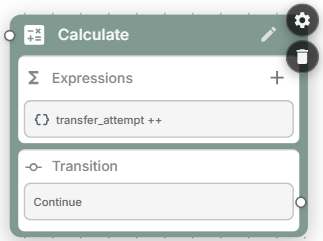
When using assignment operator, specify variable values “as is” – and do not enclose them in curly brackets. For example:
total_participants = adults_num + children_numOn the right-hand side of the assignment you may use arithmetic operators, functions and the rest of the expression syntax. For the complete reference, see Expression syntax.
Transitions
Calculate node has a single “continue” transition. Connect it to logical conditions node if you want to branch the flow based on the calculated variables data.
Calculate node settings
Global node – Enables transition to this node from any other node in the conversation flow.